Short-Lived Feature Branches
This branching model was facilitated with the advent of very lightweight branching that came with Git and Mercurial in the mid-2000’s, though there is evidence that Google were effectively doing the same in their Monorepo for some years before.
Either as branching directly off main, or in a fork of the whole repository. These branches are destined to come back as “pull requests” into the main/trunk, but only count as Trunk-Based Development if integrated after a prioritized code review. Time spent waiting for review counts towards the branch’s short life.
With the Pull Request (and code review) advance, the cut-off point for team sizes that graduated from “direct to the trunk” to short-lived feature branches moved lower. For teams writing code without AI coding agents, it was up to 100 before Git’s lightweight branching, and is now up to 15 people. With 16 or more, the team is more productive with short-lived feature branches, and corresponding CI daemons verifying those in advance of commits landing in the trunk.
With agentic coding: those numbers count people, and people were a fair proxy for the rate of commits. They are not any more. The same enterprise team, with each developer running several coding agents, can be an order of magnitude more productive against its goals, committing at a rate that once took a team several times its size. Count concurrent writers (humans and agents) and the peak commit frequency instead. That means the crossover to short-lived feature branches can arrive with far fewer people. But moving to pull requests moves the constraint to human review, unless review is AI-led (see AI coding agents below). The alternative is staying with committing straight to the trunk behind a commit queue. Enterprise governance may also keep the pull request in place, with a named human approver for segregation-of-duties reasons, even when the integration itself could be direct.
Startups and scale-ups: an AI-native startup or scale-up may run at ten times the throughput of the best established enterprise team. A handful of people, each with several agents, on a young codebase that agents work well in, can hit the race to push at a team size where nobody would have thought about branching models before. Without enterprise governance there is often no reason for a pull request beyond review, so committing straight to the trunk with a commit queue and AI-led review is the natural fit, as long as the tests and the build keep up.
One key rule is the length of life of the branch before it gets merged and deleted. Simply put, the branch should only last a couple of days. Any longer than two days, and there is a risk of the branch becoming a long-lived feature branch (the antithesis of trunk-based development).
Of course, bug fixes are not features as such, but the “short-lived feature branches” means them too. Perhaps “short-lived change branches” means both, but we’re stuck with the features name by now.
Another key rule is how many developers are allowed congregate on a short-lived feature branch. Another simple answer: the developer count should stay at one (or two if pair-programming). These short-lived feature branches are not shared within a team for general development activity. They may be shared for the purposes of code review, but that is entirely different to writing production code and tests.
With agentic coding: the unit is one developer and their coding agents. A branch with one developer and three agents working on it is still one unit, as long as it is that developer’s agents and that developer’s intention. Two developers' agents congregating on the same branch is two units, and the same risk as two developers.
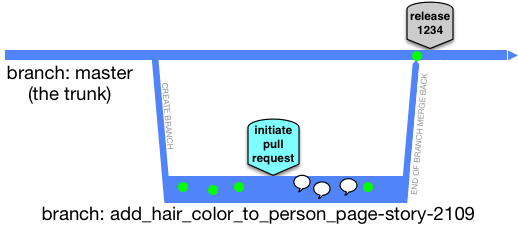
Sometimes the community calls these ’task’ or ’topic’ branches, instead of long-lived feature branch.
Merge directionality
Short-lived feature branches are real branches and merge is a first class concept. In the run-up to completing work on the short-lived feature branch, you will need to bring it up to date with main (trunk). That is an effective merge whichever way you do it. Look at the branch at this moment, it may appear to be much younger than it was before that operation. The changes have to now go back to main (trunk) in another merge operation. In GitHub, for ‘pull requests’ (or equivalent in other platforms), the user interface may handle that last merged back for you, and even go as far as to delete the short-lived feature branch.
To recap: merges to the short-lived feature branch are allowed to bring it closer to HEAD of main (trunk). Merges to main (trunk) are allowed only as part of closing out the short-lived feature branch (and just before deleting it).
Two developers concurrently doing short-lived feature branches
Say two features are being worked on concurrently: features X and Y. Both will take a day to complete, and two developers are working independently on them. Or four developers if pair-programming is that team’s way. The reality of the merge back to main/trunk, before the deletion of the short-lived feature branch, is that a merge of changes from main/trunk is often needed, before the merge to main/trunk.
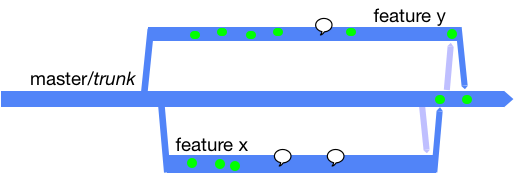
Workflows include:
- Attempt to merge to main/trunk and if that’s blocked do a merge/pull from main/trunk before attempting the push again.
- Do a speculative main/pull from main/trunk before attempting any push to main/trunk.
The latter leaves no trace if there’s nothing to merge in from the other branch.
Workstations included
Really though Developers work on their own workstations. That is both for their “working copy” as well as their local Git clones complete with branches:
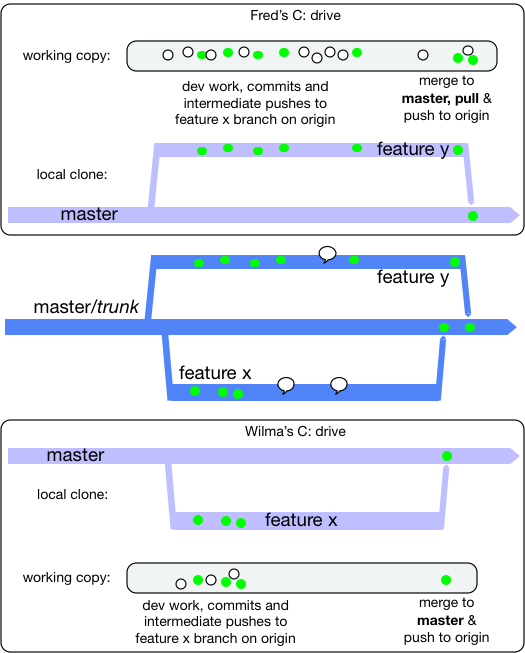
The white dots are just general development work (save files from the IDE), and the green dot is the same but validated by a local build that passes and a maybe a local commit.
While each developer works, they maintain a local clone of the main/trunk and their own short-lived feature branch only. Indeed for a period of time, their short-lived feature branch may not yet exist in the shared origin repo.
Personal preferences
At some point, the short-lived feature branch has to be brought right up to date with main (trunk) in a merge operation before the result being merged back to trunk (and the branch deleted). There are a number of approaches for this, and while teams may have a policy, some teams leave it to personal preference for the developer.
Git stash
Some people do git stash before git pull before git stash pop. There’s a chance that when you pop your
working copy may be in a merge clash situation that has to be resolved before you progress. This way will always
result in your change being a single commit, at the HEAD of the branch (as Subversion would always do).
Git rebase
Some people do git rebase. Refer to a well written Atlassian document on this  as well as one from ThoughtBot that talks about
squash too. Even with this model,
you may encounter a merge clash, and have to resolve that locally before you can push the result anywhere, or do
further merges (to main hopefully).
Git worktrees
Git (since 2.5 in 2015) can have more than one working copy attached to the same local clone: git worktree add ../myrepo-hotfix some-branch.
Each worktree is a separate directory with its own branch checked out, but they all share one .git object store, so making
one is fast and cheap on disk compared to a second full clone. Mercurial has hg share for much the same thing. Subversion and
Perforce users always had the equivalent by way of multiple checkouts or client workspaces - it just cost more.
Worktrees have some good uses for Trunk-Based Development teams:
- Checking out a colleague’s pull request to review it, or run it, without stashing or committing your own work in progress.
- Doing a cherry-pick to a release branch for a bug fix, while your trunk (or short-lived feature branch) work stays untouched in the other directory.
- Letting a long local build or test suite run in one worktree while you carry on editing in another.
git bisectto find which commit broke the build, again without disturbing what you were doing.
Git will also refuse to check out the same branch in two worktrees at once, which is a nice guard against confusing yourself.
The risk: one developer, many branches
The rule above is that a short-lived feature branch has one developer (or one pair, or one developer and their agents), and lasts no more than a couple of days. The flip side of that rule, that is easy to forget, is that a developer (or pair) should have only one short-lived feature branch in flight. Before worktrees, switching between branches in the same working copy was a mild pain, and that friction kept most people focused on one thing. Worktrees remove the friction, so it becomes easy to have four or five branches open in four or five directories, each of them a day or two old and each of them getting older while you attend to the others. Every one of those is drifting further away from HEAD of main (trunk), and every one is a merge you have not yet done. That is the beginning of long-lived feature branches, just spread sideways rather than lengthways.
If you do have more than one worktree in play, then:
- Each branch in each worktree is still bound by the two-day rule, independently.
- Each one should be brought up to date with main (trunk) and merged back in its own right. Merging one in-flight worktree branch into another is #2 and #4 in “Breaking the contract” below, even when both are yours.
- Delete the worktree (
git worktree remove) when its branch is merged and deleted.git worktree listtells you what you have forgotten about.
Shared nothing, still
Worktrees share the clone, but they also share the workstation. If two worktrees each want to bring up the application, they will fight over the same TCP ports, the same local database, the same Docker container names and perhaps the same build caches. The shared nothing microcosm discipline needs to extend to being able to run more than one copy of the application side by side on a single machine, with nothing other than configuration differing between them.
AI coding agents
AI coding agents have made worktrees much more popular, as giving each agent session its own worktree lets several of them
work in parallel without trampling each other’s files. That is fine, but each of those agent sessions is a short-lived feature
branch, and everything above applies to them. The rate at which branches can be created has gone up, but the rate at which
they can be reviewed and merged safely into main (trunk) may not have. Pete Hodgson and others discuss that in a LeadDev panel,
“What to do when there’s too much code to review". A team that applies its human-centric review practices
to AI-boosted development throughput is going to hit problems, whether that is within the team or with a flood of unsolicited
pull requests to a public open source project. The review side needs boosting too: AI-assisted code review, and more
non-AI objective checks (linting, static analysis, tests, coverage and the like) run by CI jobs against each pull request,
so that humans spend their review time on what only humans can judge. Perhaps even AI-led review, with humans second, or
humans only brought in when the AI thinks arbitration is needed. Kief Morris describes that shift, from humans “in the loop”
inspecting each artifact to humans “on the loop” improving the harness that produces them, in “Humans and Agents in Software
Engineering Loops".
Keep each agent’s change small, review and integrate them one at a time (re-syncing the others with main/trunk as each lands), and throw away the worktrees that did not work out rather than letting them linger. If agents are allowed to skip the pull request and push directly, see AI coding agents committing straight to the trunk.
Pitfalls
Working towards a pull request can sometimes make you look past the power of streaming a series of small commits into trunk for the benefit of all. High-throughput XP teams from the end of the 90’s onward would stream tens of commits a day (per pair) into the trunk. Each commit would be an incremental step forward and able to go live as is, were the team to change plans to do so. A mistake in thinking for this way of working, is one pull-request for one Agile story/card (and no more). Getting out of that mind trap would be to practice (say) a pull-request for refactoring and see that integrated/merged into the trunk, then a pull-request for a piece of new functionality (and integrated into trunk), then perhaps another refactoring (trunk integrated again). And for those three pull-requests they shared the same Story/card association, but perhaps had different short-lived branch names - each of which was deleted after merge/integration.
Breaking the contract
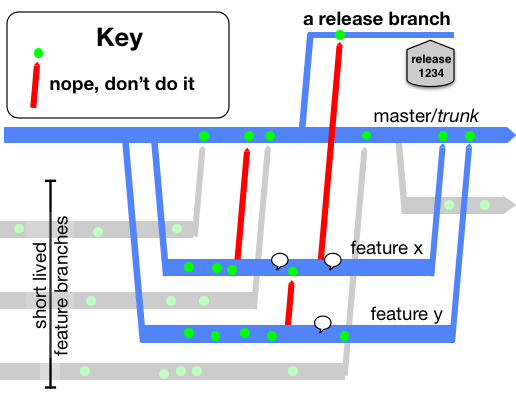
If you merged the part-complete short-lived feature branches to anywhere else, then you have broken the contract of trunk-based development. For short-lived feature branches, these are not allowed:
- intermediate merges to main (trunk) - at least where the commit was not able to go live on its own
- merges (intermediate or not) to other people’s short-lived feature branches
- merges (intermediate or not) to any release branches (if you have them)
- variations of #2 that are direct from/to the developers clone on their workstation
- other developers (or their coding agents) joining you on your short-lived feature branches - at least who are not your pair-programming partner.
Alternatives to short-lived feature branches
There is a more traditional alternative for smaller teams: Committing straight to the trunk. Many people still prefer this way of working, and if the whole team can do it without blowing up the build server, then great job team.
There is also the patch-review way of working that was outlined in Google’s use of Mondrian (2006), and consequentially delivered for non-Google teams with open source tools Gerrit and Rietveld (2007/8).
These two alternatives, as well as short-lived feature branches are compared in Styles and Trade-offs.
References elsewhere
| 26 Apr, 2007, Blog Entry |
| Introducing Branch By Abstraction |